
Lesser Antilles
Bridgetown
Roseau
St. John's
Road Town
Cancún
Mérida
Honduras
Belmopan
Bilwi
Nicaragua
Managua
George Town
Cuba
Guatemala
Guatemala City
Acapulco
Tuxtla Gutiérrez
Mexico City
Bahamas
Nassau
Gulf of Mexico
Havana
Miami
Florida
Tallahassee
Monterrey
Ciudad Victoria
Baton Rouge
Louisiana
Austin
Texas
Odessa
Hermosillo
Chihuahua City
Fresnillo
La Paz
Culiacán
Mexico
Ciudad Juárez
Hamilton
Richmond
Washington
Harrisburg
New York
Raleigh
North Carolina
Iowa
Minnesota
Saint Paul
Des Moines
Nebraska
Pierre
South Dakota
Bismarck
North Dakota
Hibbing
Fargo
Frankfort
Charleston
Columbus
Atlanta
Columbia
Nashville
Indianapolis
Springfield
Mississippi
Illinois
Virginia
Ohio
Kentucky
Tennessee
Indiana
Alabama
Georgia
Montgomery
Phoenix
Arizona
Moab
Gallup
New Mexico
Santa Fe
Colorado
Denver
Utah
Salt Lake City
Lamar
Lubbock
Jefferson City
Little Rock
Jackson
Arkansas
Oklahoma
Missouri
Kansas
Dallas
Oklahoma City
Topeka
United States
Lincoln
Halifax
Nova Scotia
Fredericton
Charlottetown
Newfoundland
Gulf of Saint Lawrence
New Brunswick
Maine
Quebec
Montpelier
Albany
Ottawa
Saguenay
Matane
Lake Ontario
Augusta
Boston
New York
Pennsylvania
Toronto
Lake Erie
Lake Superior
Lake Huron
Lake Michigan
Wisconsin
Michigan
Lansing
Madison
Thunder Bay
Marquette
Sudbury
Rouyn-Noranda
Cheyenne
Wyoming
Pocatello
Rapid City
Havre
Billings
Montana
Helena
Caribbean Sea
Kingston
Port-au-Prince
Holguín
Cockburn Town
Dominican Republic
Guadalajara
© OpenStreetMap contributors
Wednesday 3
  • 03
  • 06
  • 09
  • 12
  • 03
  • 06
  • 09
Thursday 4
  • 03
  • 06
  • 09
  • 12
  • 03
  • 06
  • 09
Friday 5
  • 03
  • 06
  • 09
  • 12
  • 03
  • 06
  • 09
Saturday 6
  • 03
  • 06
  • 09
  • 12
  • 03
  • 06
  • 09
Sunday 7
  • 03
  • 06
  • 09
  • 12
  • 03
  • 06
  • 09
Monday 8
  • 03
  • 06
  • 09
  • 12
  • 03
  • 06
  • 09
Tuesday 9
  • 03
  • 06
  • 09
  • 12
  • 03
  • 06
  • 09
Wednesday 10
  • 03
  • 06
  • 09
  • 12
  • 03
  • 06
  • 09
Thursday 11
  • 03
  • 06
  • 09
  • 12
  • 03
  • 06
  • 09
Friday 12
  • 03
  • 06
  • 09
  • 12
  • 03
  • 06
  • 09
Saturday 13
  • 03
  • 06
  • 09
  • 12
  • 03
  • 06
  • 09
Sunday 14
  • 03
  • 06
  • 09
  • 12
  • 03
  • 06
  • 09
Monday 15
  • 03
  • 06
  • 09
  • 12
  • 03
  • 06
  • 09
Tuesday 16
  • 03
  • 06
  • 09
  • 12
  • 03
  • 06
  • 09
Wednesday 17
  • 03
  • 06
  • 09
  • 12
  • 03
  • 06
  • 09
6 PM
Go Premium
kt051020304060
Developed with
Download App
Windy Apple Watch
Windy Apple Watch
-
1587 days ago
31
...

Whether you are out doing sports or simply do not have time to reach out for your phone, the Apple Watch version of Windy is here for you to give you the most recent weather forecast along with new exciting features right from your wrist.

Let's take a look at all the options Windy gives you with your Apple Watch. When you open the app, you will find several choices from Forecast to Weather radar. Find what each of them mean below.

Forecast

The first option in the menu is Forecast, where you will find forecast for the next upcoming 10 days in 3 hour intervals. You can click on each hour interval to access more detailed overview containing information about Rain, Wind, Wind direction and Dew point. Use digital crown to scroll up/down.

Wind forecast

Wind forecast shows forecasted wind strength for the next 2 days in the current location. For moving the timeline, use the digital drown on the side of Apple Watch.

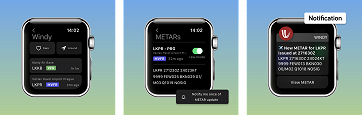
METARs

If you have any METARs in favorites in the app and have accessible iCloud, those METARs will be synchronised with your Watch and you will see them here.

In case you do not have any saved METARs nor you have active iCloud, you can still search for airports manually by typing ICAO codes or you can view airports nearby in the "Around" option.

You can save airports with "Add METAR" and start receiving METAR notifications by turning on "Notify me once of METAR update" option in the airport detail.
Radar (beta)

Radar shows Doppler radar composite. Use digital crown to zoom in or zoom out on the map.

Tapping on the map will hide control elements, so you can view radar map without any disturbing components.

Watch Faces and Complications

Windy comes with its own Watch Face and you can add it directly on your watch under Watch Faces or in the Watch application on your iPhone.

You can customise each Face according to your wish with Complications that are available within each Watch Face.

Complications are also shortcuts to access a specific functions of an app. Windy offers Infograph Modular Face.

Please also note that Complications are only available for Apple Watch ver. 4 or above.

Settings

Here you can choose whether you would like to synchronise your units selection from the app or set units manually. If you do not have active iCloud, units will not synchronise.

31 claps

Comments (12)

Doblomasy
Doblomasy 4h ago
👍🏻✨🥂🍾✨🫶🏻✨👏🏻✨🌎✨👏🏻✨🫶🏻✨🥂🍾✨👍🏻
lbernardrivas 766 days ago
I'm using a windy complication on an Apple Watch Ultra 2 face. The complication has a location from a couple weeks ago and when I tap on it, it shows a location from more than a day ago. How do I get the Windy Apple Watch complication to show weather data for my current location? I checked locations on the Windy Apple Watch app and it's set to current location so that's not the answer.
rkalasek 774 days ago
i can‘t find that watch face - neither on the watch nor on the iphone app (watch: ultra 2 / sw: 10.3.1, iphone sw: 17.4.1)
on the phone windy app provides the „watch faces“ entry on the burger menue in the last section of the menue - but selecting the „add watch face“ entry crashes windy app.
any suggestions ?!
best robert
Dominique Lannebère 797 days ago
Ou et comment puis-je « charger » l’écran Windy pour mon Apple Watch ?
Bartłomiej Czech 827 days ago
Is that possible to add waves forecast to AppleWatch widget ?
What's New on Garmin: The Windy Update You May Have Missed
Nicole Dolezalova
-
updated 3h 35m ago
Thermals: the invisible engine of unpowered flight
Jari Sochorová
-
updated 8 days ago
Windyty, S.E. Acquires Majority Stake in meteoblue, A.G.
-
updated 8 days ago
What's New in v50: Read the Avalanche Bulletins, Trace the Wind, Plan the Passage
Nicole Dolezalova
-
updated 8 days ago
Holiday Update: New Tools for Winter Weather and Ocean Forecasts, Meet Version 48
-
updated 15 days ago
Winter Weather: From Snowflakes to Extreme Snowfall
-
updated 23 days ago
What's New in v49: Faster, Smarter and made to Fly
-
updated 28 days ago
Windy Gets Smarter with Speed Vector and iOS Webcam Widgets
Nicole Dolezalova
-
updated 47 days ago
Spring in the Air: How CAMS Pollen Forecasts Are Made
-
updated 63 days ago
Earth Day with Windy: Understanding the Power of Our Planet
-
updated 65 days ago