


Version 49 is a major milestone that makes Windy significantly more capable on mobile while improving performance and interaction across platforms, bringing advanced plugins and a smoother Leaflet GL–powered map experience so you can access desktop-level tools wherever you are.
Key Updates
- Faster & Smoother app experience (Leaflet GL)
- Mobile-Ready External Plugins
- Expanded Airports POIs for Aviation community
- Local forecast models on iOS Widgets
- New Garmin Weather Widget Lite
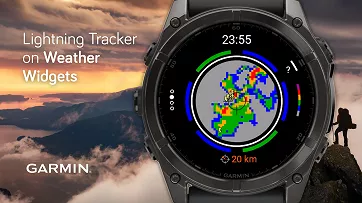
- Lightning Tracker in Garmin Weather Widgets
A faster and smoother app experience powered by new technology
Under the hood, Windy has transitioned to Leaflet GL — a major technical upgrade that significantly improves map performance.
Thanks to extensive community testing, we are delivering a faster, more stable experience when exploring layers on both desktop and mobile.
What you will notice:
- Smoother zooming and panning
- Greater stability when working with complex layers
- Improved responsiveness on mobile devices
As part of this transition, Windy now supports double-tap and drag on phones, making it faster and more intuitive to explore forecasts with one hand.
This upgrade applies to all layers except the Windy Premium 3D globe.
Before
After
External plugins and GPX uploader are now on mobile versions
Until now, plugins were primarily a desktop experience. With the new version, Windy plugins are fully accessible on mobile devices.
- Access and install external plugins
You need to be logged in to install and activate plugins. All plugins are automatically synced to your account via the cloud. - Access the Windy Plugins Guide on how to develop your own plugin
- Join the Windy Plugins developer community
In the Extend your Windy section, you can now also find an uploader for your favorite routes and locations. Upload, display, and share your KML, GPX, or GeoJSON files—now also directly from your mobile phone.
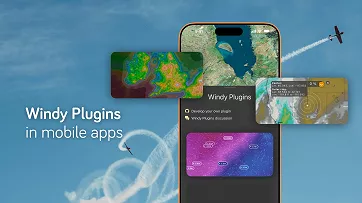
Where to Find Windy Plugins
- Open the Menu in the app.
- Scroll down to the Extend your Windy section.
- Tap Install Windy Plugin.
A list of available plugins will appear. - Select a plugin to view detailed information about it.
- Tap Install Plugin.
- Once installed, tap Open Plugin to activate it in Windy.
This update unlocks even more powerful workflows in the field — whether you’re checking marine conditions, planning a flight route, preparing a hot air balloon trip, or searching for clear skies to watch the aurora borealis or capture the perfect astrophotography shot.
Explore the wide range of Windy Plugins developed by our community and discover new ways to tailor Windy to your needs.
Built for IFR & VFR Pilots
Windy has become a trusted weather tool for everyone from general aviation pilots to airline crews. Airport POIs have been refined to support that and to provide smoother pre-flight briefings and en-route decision-making.
Airport POIs
- More detailed runway information, coordinates, and ICAO/IATA codes
- An enhanced METAR & TAF section with current VFR/IFR status and nearby airports with their METARs, runway wind conditions, webcams, and detailed meteograms
- NOTAMs available in raw and decoded formats, with the option to mark as read
Route Planner (available to Windy Premium users)
- A faster Route Planner — type departure and destination ICAO or IATA codes (e.g.,KLAX KJFK for ICAO, or LAX JFK for IATA) in the Search bar and open the route instantly
These upgrades make critical flight information clearer, faster to access, and easier to interpret — when timing matters most.
iOS widgets with extended local forecast models
Windy widgets on iOS now support additional high-resolution local forecast models:
- North America: HRRR, HRDPS, NAM
- Europe: UKV, AROME, ICON, ALADIN
- Asia: MSM
- Australia: ACCESS
Available:
- On iPhone and iPad widgets
- In mirrored iPhone widgets on macOS and CarPlay
This gives you faster access to precise local forecasts — directly from your home screen or dashboard.
New Lite version of the Garmin Weather Widget
We’re introducing Weather Widget Lite — a streamlined, lightweight version of the full Windy Weather Widget, designed to run smoothly on Garmin devices that were previously limited in supporting the full version.
By optimizing performance and reducing system demands, the Lite version makes Windy available on a broader range of devices, including models with hardware limitations.
The widget works in both color and black-and-white modes:
- In color mode, it includes lightning detection (a new feature for the Weather Widget overall).
- In black-and-white mode, lightning is not displayed due to technical limitations of these devices.
The Lite version brings you
- Point Forecast
- Radar
- 3-Hourly Forecast
- Daily Forecast
The widget is now available on some of the most popular Garmin devices, including:
- fēnix® 6 series
- Forerunner® 245 / 745 / 945
- Instinct® 2 series
- Enduro™
- quatix® 6 series*
See the full list and download on Garmin Connect IQ.
Tracking storm on Garmin Weather Widget (full version)
The main Garmin Weather Widget has also been updated to improve clarity and reliability.
- lightning detection on the radar, providing faster visual insight into active storms directly from the widget
- general optimizations and stability fixes
With fast access to essential weather information directly on your wrist, Windy continues to support athletes, pilots, sailors, and explorers who rely on reliable forecasts in motion.
Access the Garmin Connect IQ and download Windy on your wrist now!
Minor Improvements: Built for What Comes Next
Sections across the app are now fully unified in our preferred dark theme, creating a more consistent and comfortable experience.
Behind the scenes, Version 49 delivers important stability improvements and technical refinements that strengthen performance across web and mobile.
What’s improved under the hood:
- Expanded Dark Mode support across key plugins, including Login, Consent, Subscription, Context Menu, Air Quality, Stations, and CAP Alerts.
- More reliable external plugin syncing, now properly updating across devices and cloud sessions.
- Improved WebGL recovery handling, reducing unexpected reloads and visual glitches.
- Fixes for mobile deeplinks, airport interactions, and Route Planner behavior (including proper IATA/ICAO handling).
- Enhanced METAR/TAF parsing and airport plugin reliability.
- Add precipitation type visibility toggle in the Settings.
- Internal refactors improving login flow, plugin initialization, and overall app stability.
These improvements lay the groundwork for faster development, smoother performance, and a more robust Windy experience going forward.
Tried the new features?
Have feedback or ideas for what should come next?
Let us know in the comments.
Thanks for being part of the Windy community, and enjoy the update.
3 Quick Pro Tips for Mobile Users
1) Tap the 🏠 button to quickly move to your start-up location
2) Long-tap 🏠 to open forecast details of your start-up location
3) Tap the 📌 to access the Forecast models and Favorite Layers & POIs
Photo on header by Mohamed Nohassi on Unsplash.
Photo on splashscreen by Seb Mooze on Unsplash.
Comments (14)